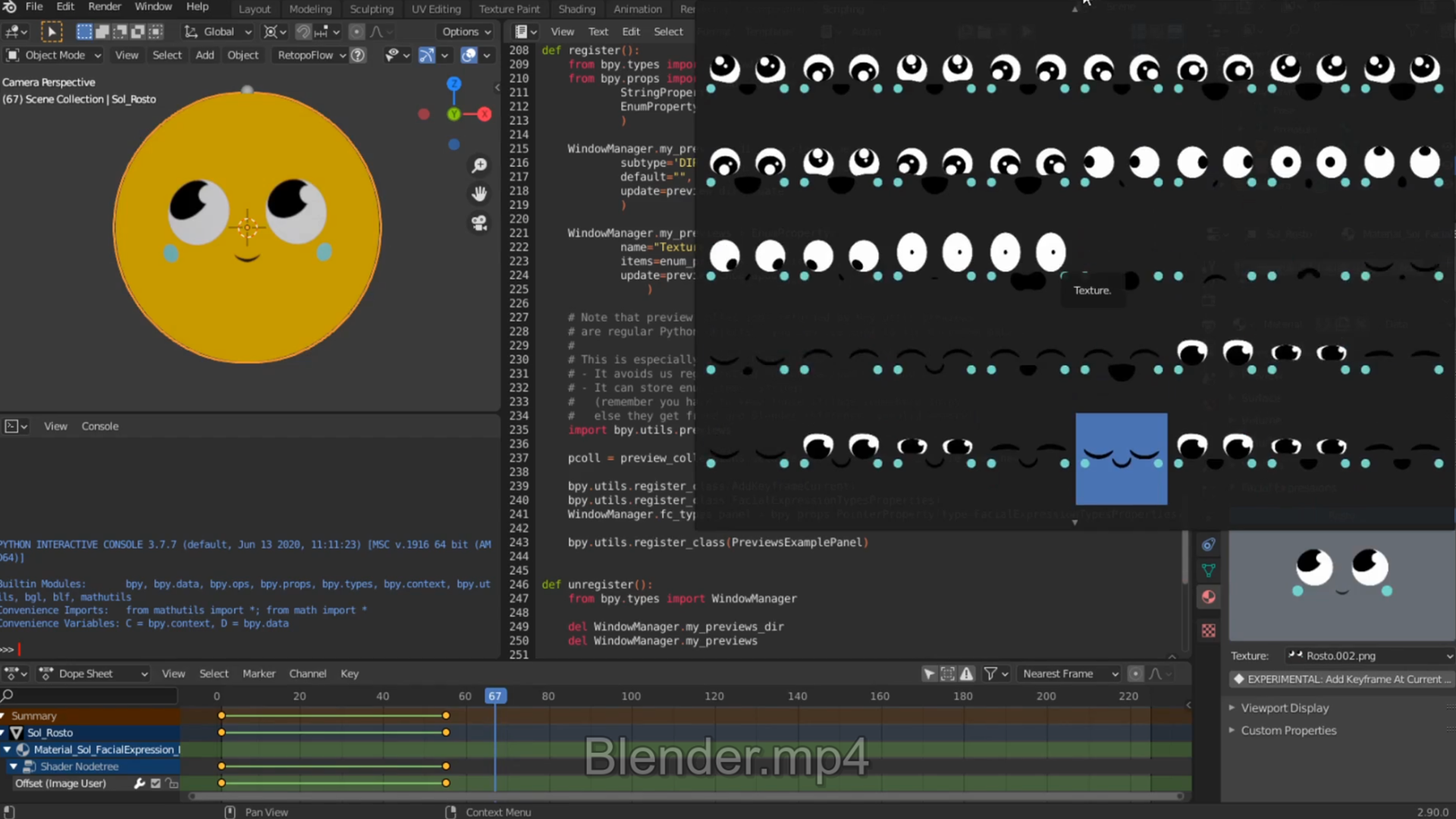
Blender Expressions Add-on
Python add-on that speeds up facial-expression keyframing · built for D2R Studios' animator, 2019
- RoleTool Designer · Programmer
- Year2019
- EngineBlender · Python
- ForD2R Studios
Highlights
- Designed around one animator’s workflow: every facial expression for a character in one panel, picked with a click instead of digging through textures
Overview
An add-on I built in 2019 at D2R Studios to help the studio’s animator change the textures of a character’s facial expressions with fewer clicks: around 3 clicks saved per keyframe when swapping faces. He still uses it today.
Technical deep dive
How it works
Facial texture files follow a naming convention that links them to face objects. For example, CharacterName_Face_LeftEye looks for a CharacterName folder at the root of the .blend file, then a Face folder inside it, then LeftEye. In the scene, the character’s main object is CharacterName, with a Face child object and LeftEye at the bottom of that hierarchy.
Everything found is listed under Facial Expressions, ready to be chosen, and a button adds a keyframe at the current moment in time.
Challenges
Learning Blender’s add-on API and shipping a plugin quickly enough to be useful, while fitting the existing pipeline and not taking time from my main work, since this was a side project for the company.
Like this project? Get in touch or connect on LinkedIn.